¿A dónde se fue tu día? Where did your day go?
Una línea de tiempo delgada bajo la barra de menú de tu Mac. Tu día en bloques, con la hora siempre a la vista. A thin timeline under your Mac's menu bar. Your day in blocks, with the current time always in view.
Te escribimos una sola vez: cuando llegue a la Mac App Store. We'll email you once, when it lands on the Mac App Store.
El día que planeas y el día que pasa casi nunca coinciden. The day you plan and the day that happens rarely match.
El calendario muestra el plan. Un cronómetro mide lo que haces. Ninguno te muestra la diferencia. Calendars show the plan. Timers track what you do. Neither shows you the difference.
Tu día de un vistazoYour day at a glance
La barra vive justo debajo de la barra de menú, siempre encima de todo. Levantas la vista y sabes dónde estás. The bar sits right under the menu bar, always on top. Look up and you know where you are.
- La marca blanca es el ahora. No se mueve: el día pasa por debajo.The white mark is now. It stays put while the day moves past it.
- Lo que está en curso lleva borde blanco. Lo que viene espera a la derecha.What's running has a white outline. What's next waits on the right.
- Lo que termina sin confirmar queda en ámbar hasta que dices si lo hiciste: ✓ o ✗.Whatever ends unconfirmed stays amber until you say whether you did it: ✓ or ✗.
Lo que planeaste, junto a lo que pasóWhat you planned, next to what happened
Compara el día que planeaste con el que ocurrió, bloque por bloque. El plan sale de la bitácora de la app, así que no hay nada extra que anotar. It compares the day you planned with the one that happened, block by block. The plan is rebuilt from the app's log, so there's nothing extra to write down.
Plan vs. realPlan vs. actual
Plan tomado a las 08:00Plan as of 08:00Cumpliste 4 de 5 bloques planeados.You did 4 of 5 planned blocks.
Qué cambióWhat changed
Números honestosHonest numbers
Un hueco es tiempo sin registrar, no descanso. La cobertura (cuánto del día está anotado) se muestra aparte de la confirmación (cuánto de eso verificaste). A gap is unrecorded time, not rest. Coverage (how much of the day is written down) is shown apart from confirmation (how much of that you verified).
Martes, día de ejemploTuesday, a sample day
Tus horas despierto: 07:00–23:00Your waking hours: 07:00–23:00Si los huecos contaran como descanso…If gaps counted as rest… …pero un hueco es tiempo que nadie anotó.…but a gap is time nobody wrote down. Y de lo anotado, ¿cuánto confirmaste?And of what's written, how much did you confirm?
81% confirmado sobre 33% de cobertura: un fragmento bien revisado, no el día completo. 81% confirmed over 33% coverage: a well-checked fragment, not the whole day.
Revisa y cierra tu díaReview and close your day
Llena los huecos, confirma o descarta lo pendiente y cierra el día. Después mira las tendencias de la semana y del mes por categoría, y exporta a CSV. Fill gaps, confirm or skip pending blocks and close the day. Then see week and month trends by category, and export to CSV.
Solo tú sabes qué pasó en un hueco. Si fue descanso, lo marcas como libre; si no, lo conviertes en tarea. Only you know what happened in a gap. If it was rest, mark it as free time; if not, turn it into a task.
Hoy
Día abiertoDay open✓ Día cerradoDay closed-
Sin registrarUnrecordedLibreFree time10:15 – 10:25 · 10mConvertir en tareaMake it a taskTareaTaskLibreFree time✓ ConfirmadaConfirmed
-
Revisión de diseñoDesign review09:30 – 10:15¿La hiciste?Did you do it?✓✕✓ ConfirmadaConfirmedno la hicisteyou didn't do it
-
Llamada con clienteClient call14:00 – 15:00¿La hiciste?Did you do it?✓✕✓ ConfirmadaConfirmedno la hicisteyou didn't do it
-
Sin registrarUnrecorded13:15 – 14:00 · 45mConvertir en tareaMake it a taskTareaTaskLibreFree timenueva tareanew task
Funciona con tu calendarioWorks with your calendar
Los eventos de la app Calendario de tu Mac, de iCloud y de Google, flotan sobre la barra. Un clic los convierte en bloques y tu calendario no se toca. Events from your Mac's Calendar app, from iCloud and Google, float over the bar. One click turns them into blocks, and your calendar stays untouched.
Clic para pasarlo a la barraClick to move it to the bar
Privada por diseñoPrivate by design
Sin cuenta, sin rastreo, sin datos recogidos. Todo se queda en tu Mac. Si quieres, sincroniza tus Macs con una carpeta que ya sincronices, como iCloud Drive o Dropbox. No account, no tracking, no data collected. Everything stays on your Mac. If you want, sync your Macs through a folder you already sync, like iCloud Drive or Dropbox.
Cada Mac escribe solo su propio archivo, así que nunca aparecen copias en conflicto. Each Mac writes only its own file, so conflicted copies never appear.
También en tu iPhone, más adelanteOn your iPhone too, later on
Para cuando no estás frente a la Mac: ves tu día, anotas lo que hiciste y empiezas una tarea en dos toques. Comparte el día con tus Macs. Todavía no está en la App Store; la Mac va primero. For when you're away from your Mac: see your day, write down what you did and start a task in two taps. It shares the day with your Macs. It's not on the App Store yet; the Mac comes first.
-
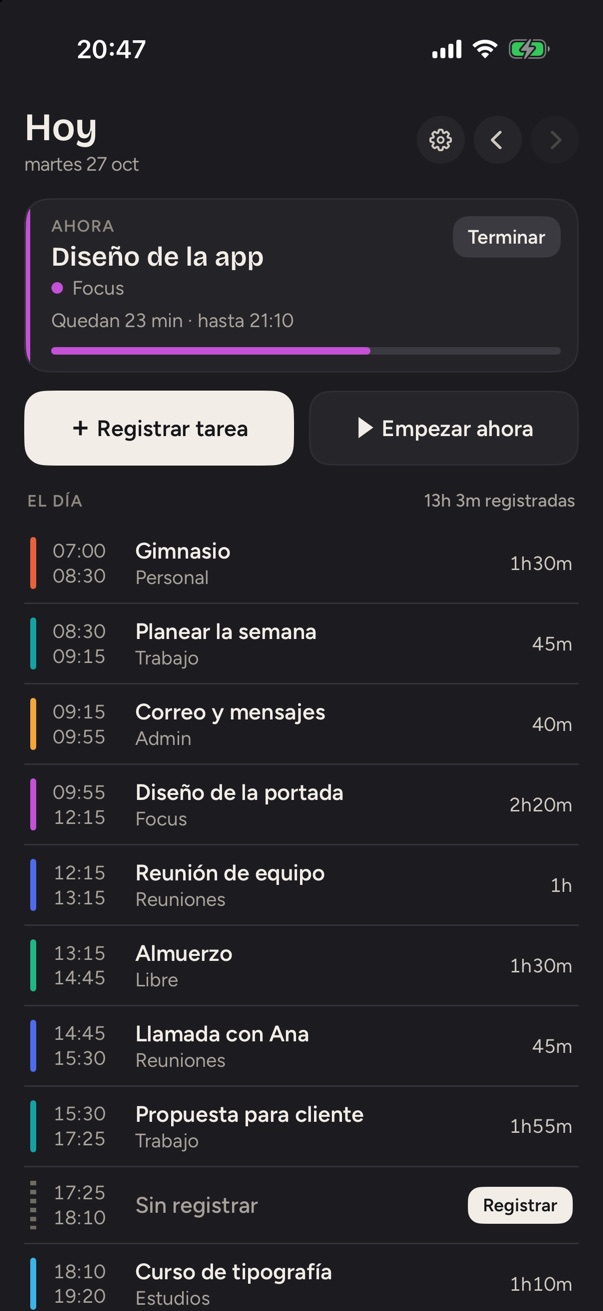
HoyTodayLo que corre ahora y el día entero, con sus huecos.What's running now and the whole day, gaps included.
-
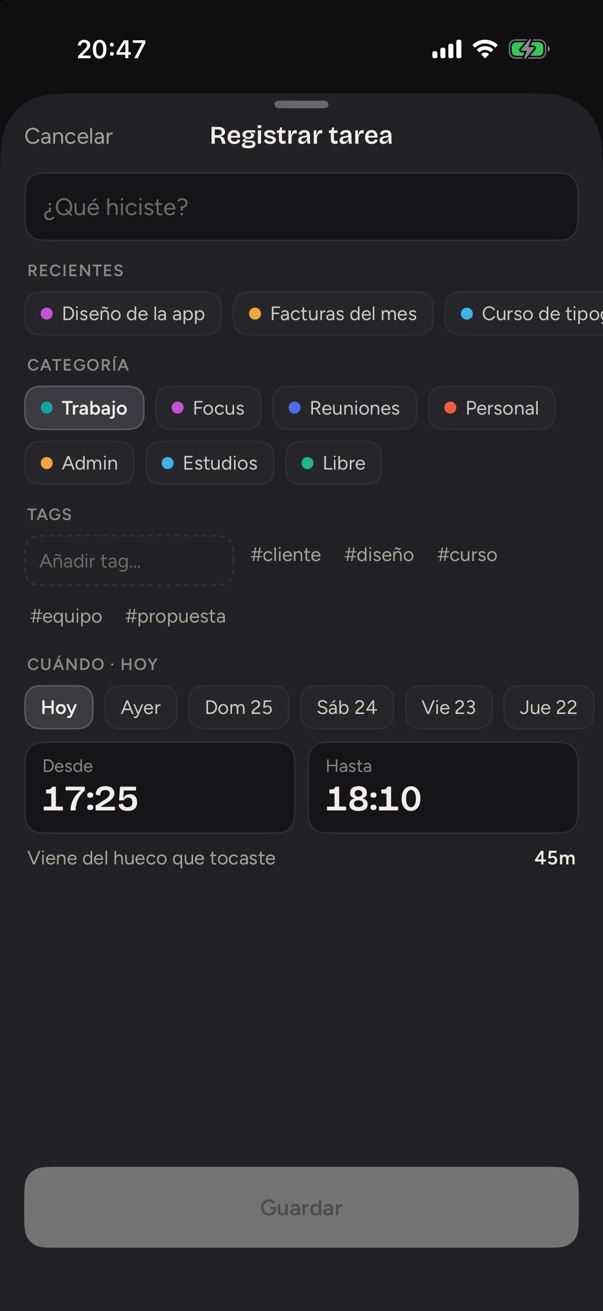
Registrar tareaLog a taskToca un hueco y di qué pasó en él.Tap a gap and say what happened in it.
-
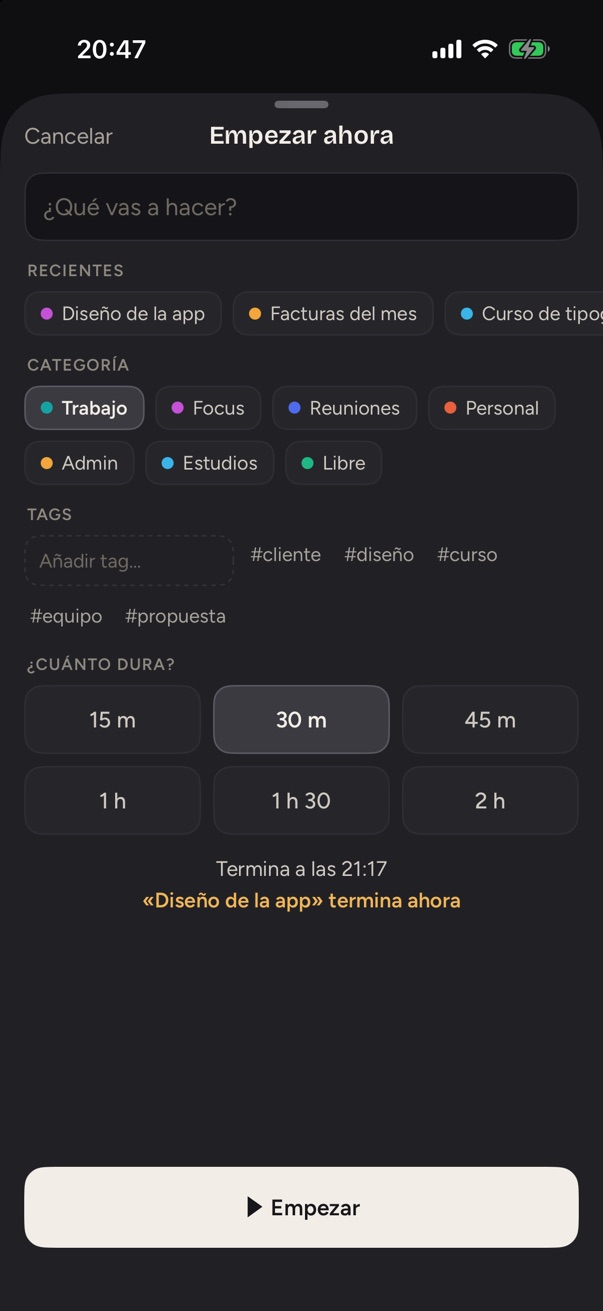
Empezar ahoraStart nowElige cuánto dura y sabes a qué hora termina.Pick how long it lasts and know when it ends.
Capturas de la versión en desarrollo, con un día de ejemplo.Screenshots of the version in development, with a sample day.
Cómo funcionaHow it works
-
1
Planea tus bloquesPlan your blocks
Arma tu día en bloques, a mano o desde tu calendario. Un bloque nuevo cae en el siguiente hueco libre sin mover nada.Lay out your day in blocks, by hand or from your calendar. A new block drops into the next free gap without moving anything.
-
2
Vive tu día con la barra a la vistaLive your day with the bar in view
La marca del ahora avanza sola. Tú solo levantas la vista.The now-marker moves on its own. You just look up.
-
3
Revisa y cierra el díaReview and close the day
Llena lo que falta, confirma lo que pasó y ciérralo.Fill what's missing, confirm what happened and close it.
[PRECIO][PRICE]
Precio muy prontoPrice coming soon
- Sin cuentaNo account
- macOS 14 o posteriormacOS 14 or later
- Español e inglésSpanish and English
PreguntasQuestions
¿Qué necesito para usarla?What do I need to run it?
Una Mac con macOS 14 Sonoma o posterior.A Mac running macOS 14 Sonoma or later.
¿Mis datos son privados?Is my data private?
Sí. No hay cuenta ni rastreo: tus actividades se guardan en tu Mac y la app no recoge ningún dato.Yes. There's no account and no tracking: your activities are stored on your Mac, and the app collects no data.
¿Se sincroniza entre mis Macs?Does it sync between my Macs?
Sí, a través de una carpeta que ya sincronices: iCloud Drive, Dropbox o Google Drive. Cada Mac escribe su propio archivo y las dos terminan con el mismo día. Se sincroniza al abrir, al cerrar, cada cinco minutos y cuando lo pidas.Yes, through a folder you already sync: iCloud Drive, Dropbox or Google Drive. Each Mac writes its own file and both end up with the same day. It syncs at launch, on quit, every five minutes and whenever you ask.
¿Funciona con iCloud y Google Calendar?Does it work with iCloud and Google Calendar?
Sí. Los calendarios de iCloud ya están en la app Calendario de tu Mac; para Google, agrega tu cuenta ahí. Sus eventos aparecen sobre la barra. La app solo lee tu calendario; nunca escribe en él.Yes. iCloud calendars are already in your Mac's Calendar app; for Google, add your account there. Their events appear over the bar. The app only reads your calendar; it never writes to it.
¿Hay versión para iPhone?Is there an iPhone version?
Está en desarrollo y todavía no se puede descargar. Primero sale la versión para Mac.It's in development and can't be downloaded yet. The Mac version comes out first.
¿En qué idiomas está?Which languages does it support?
Español e inglés. Usa el idioma de tu Mac.Spanish and English. It follows your Mac's language.

Pronto sabrás a dónde se fue tu día.Soon you'll know where your day went.
Muy pronto en la Mac App Store.Coming soon to the Mac App Store.